
How to print and glue a pattern GRASSER / detailed instructions:
Before you print a pattern, you need to check the printer settings. It must be done so that when printing does not distort the size of the pattern.
You received a file with a pattern in pdf. Find the file Test Square №2 in your order and download it. Or use first sheet in file with test square №2.
Important! Always print the Test square before printing the pattern!
Important! Do not print the file from the browser; note that printing from the browser may be incorrect. You need to print the pattern by first downloading the file to the device.
1. Open your pattern file and select «Print» from the menu.
2. Choose the device you want to print from the list.
3. Choose «Custom scale 100%» in the printer settings menu.
4. Choose «Auto portrait / landscape» In the «Orientation» settings .
Note! There is no need to put a tick in the box «Choose a paper source by pdf page size«!
Print Test Square №2 with these settings.
Measure side of the square. If the sides are 10 cm by 10 cm, then in this case you can open a file with a pattern and with the same settings print out sheets with a pattern. If the sides of the square are not 10 cm by 10 cm, then you need to return to the settings and change them in the «custom scale».
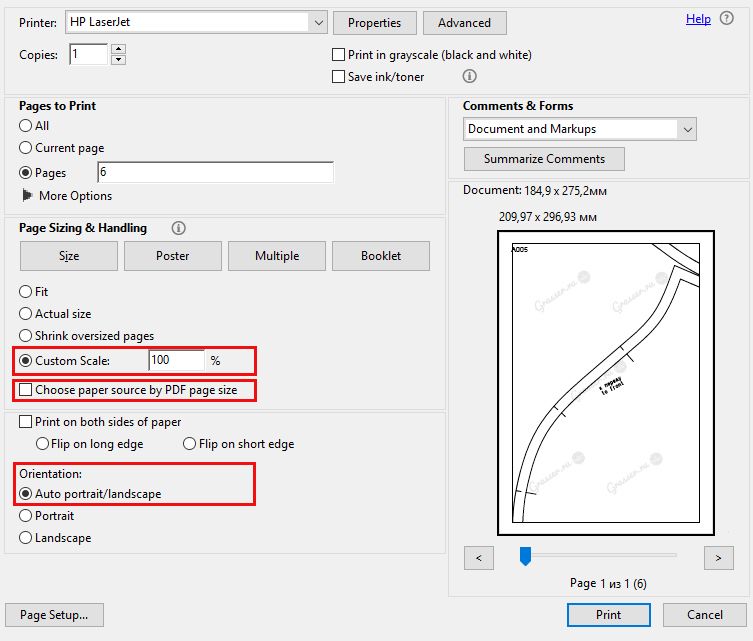
With these settings you should succeed, and you can print a pattern. We recommend opening files and printing from Adobe Acrobat Reader. All the screenshots above and print settings are for this program. If you use another program to print, the print settings may vary. A guide for the correctness of the size of the pattern is a printed Test Square №2 10 by 10 cm, which comes complete with your pattern.
Brief instructions for printing for MacBook owners
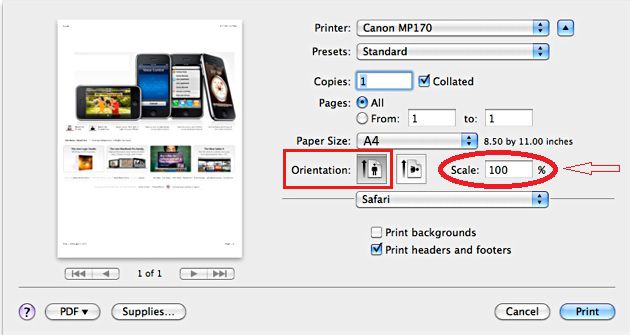
1. For the access to the additional settings, click the blue button (to the right of the «Printer:» drop-down menu). The print dialog box is displayed.
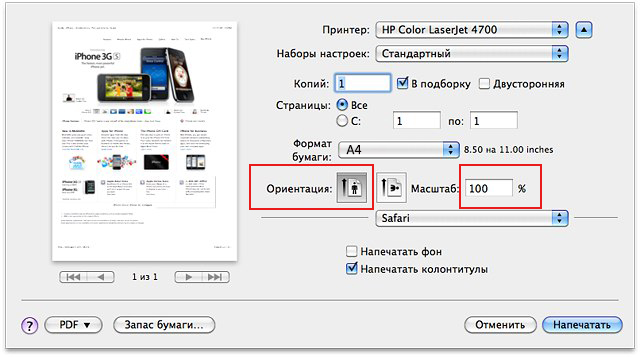
2. Select the settings. Here you can immediately set the scale. For the Test Square №2 is 100% suitable.
Next, print a pattern with the selected settings.
HOW TO FILE PRINTED PATTERN
After printing out the pattern, you can proceed to its «assembly».
All the sheets have a letter with a number in the upper left corner.
This way you can recognize the top and bottom of the sheet.
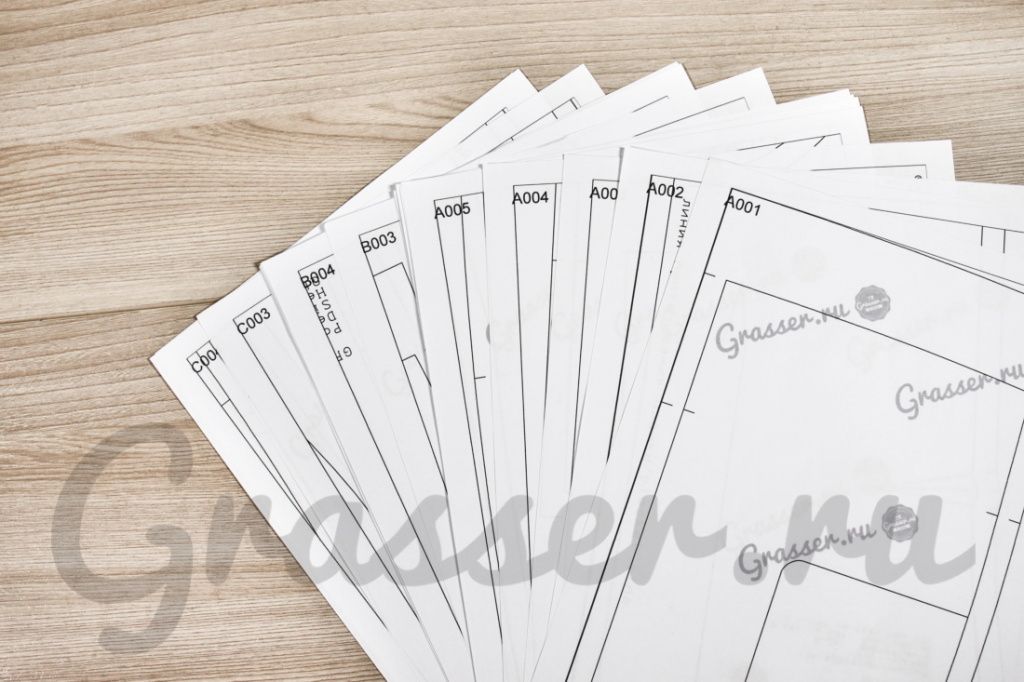
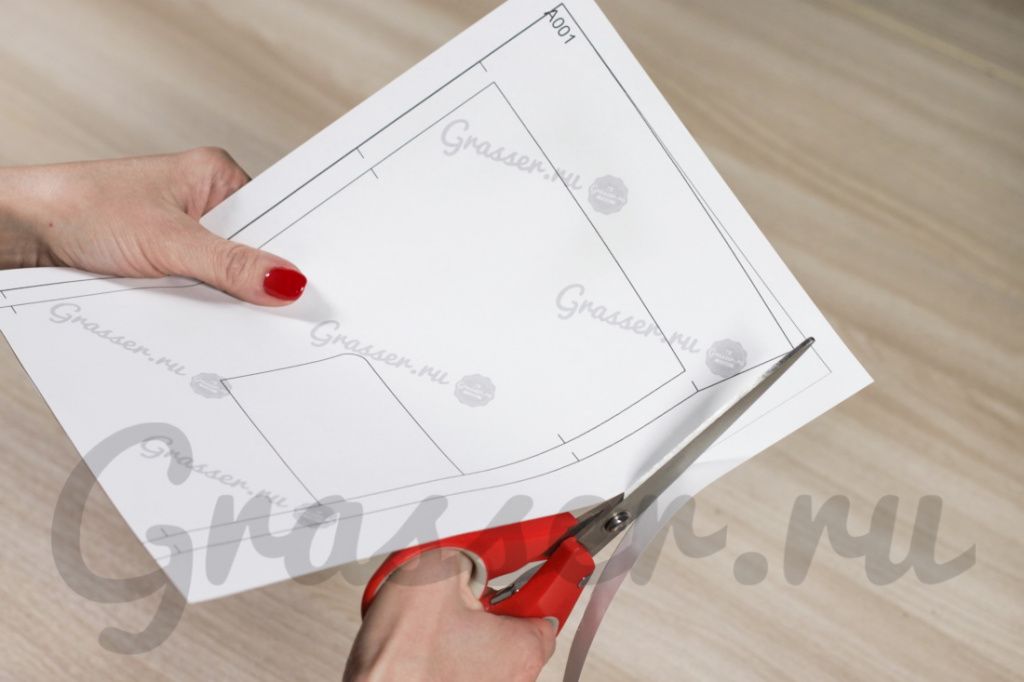
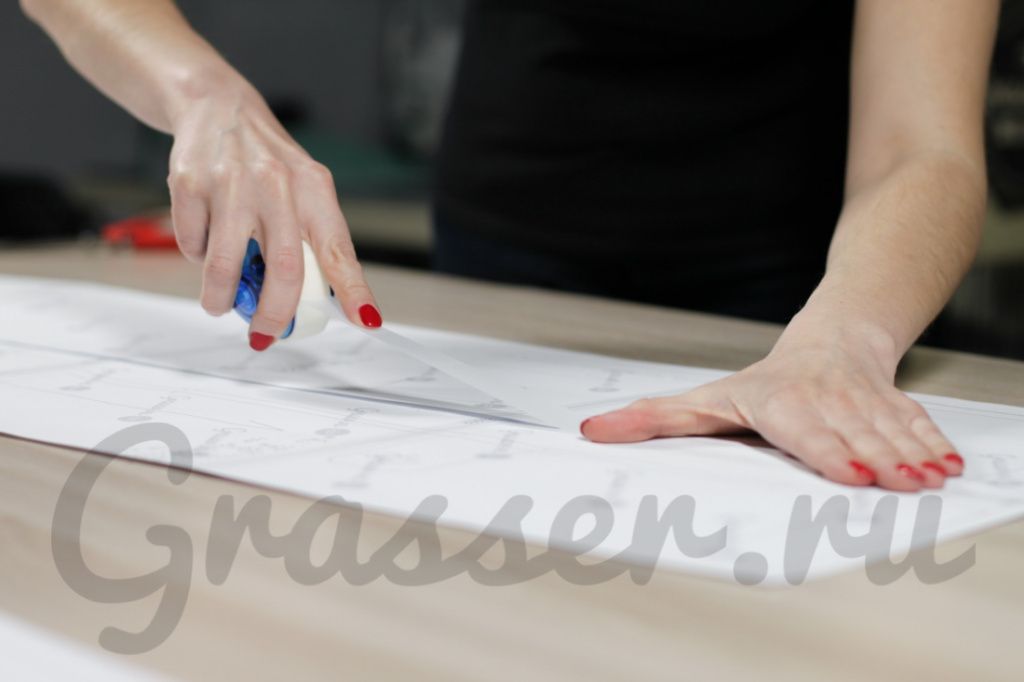
1. There is a frame around the edges of the sheets, cut it from the bottom and right. Now you need to glue the sheets according to the marks on the margins (A1, A2, . B2, B3 . ). Spread the row A into a column. It is located vertically.
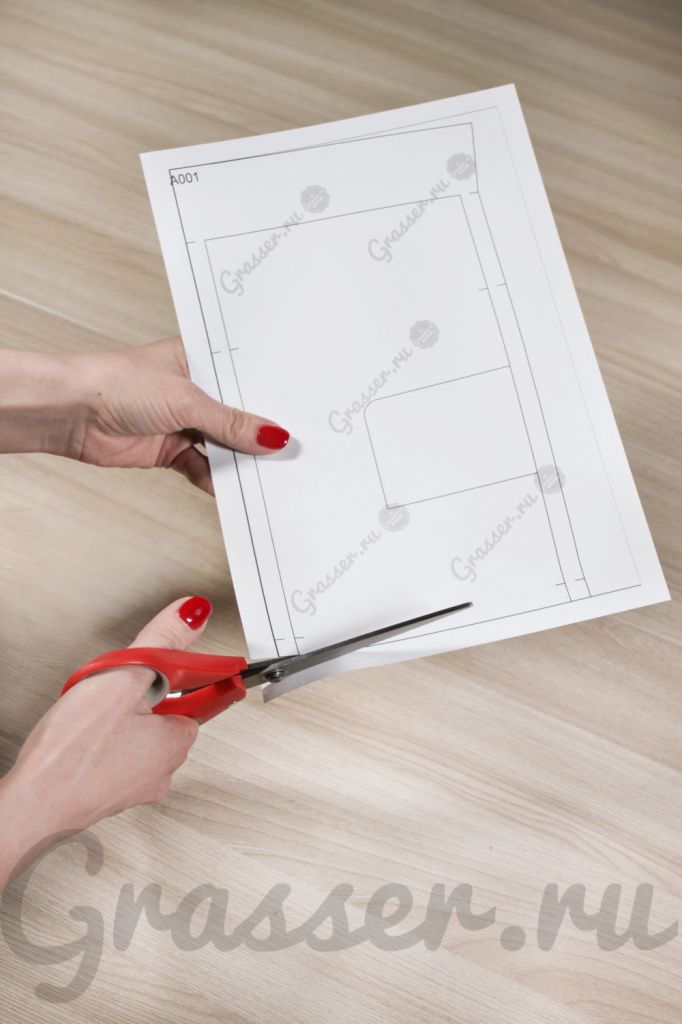
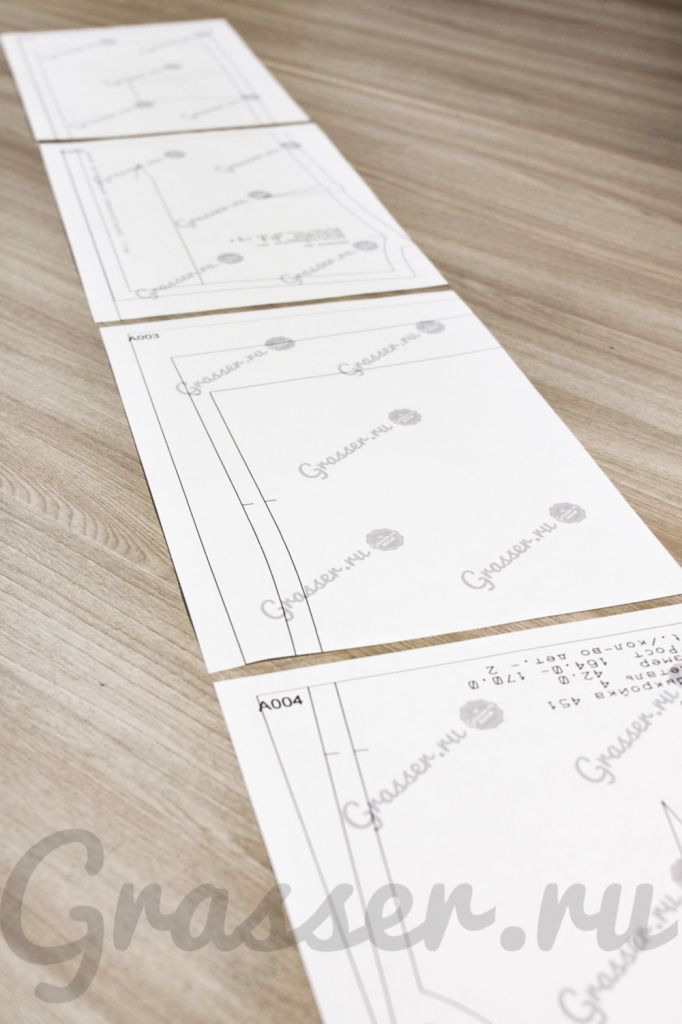
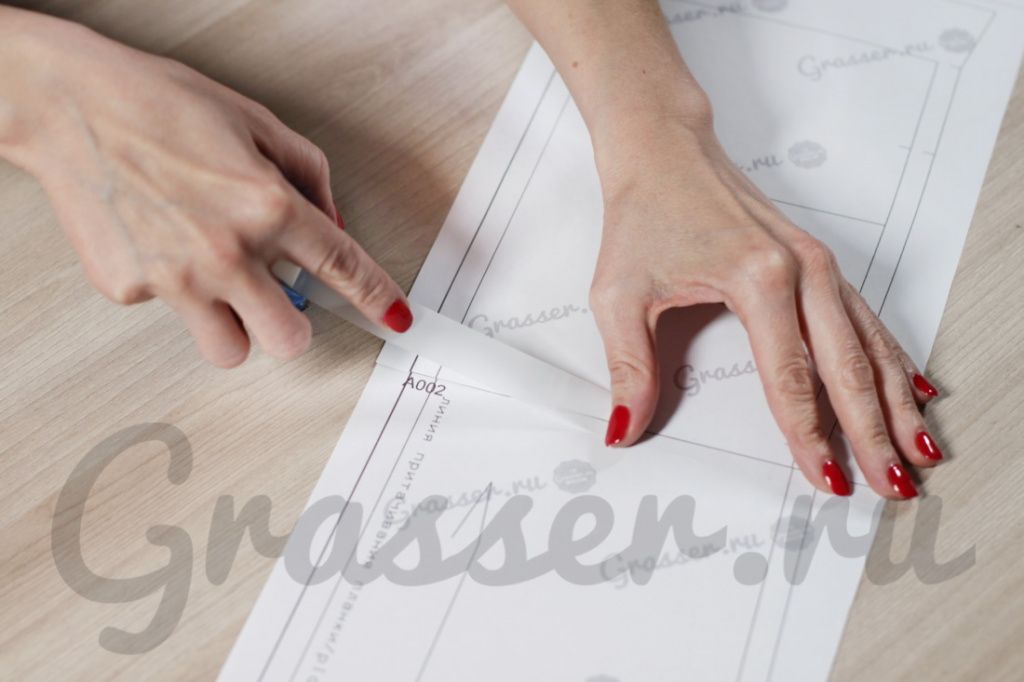
2. Glue the sheets of row A with each other. Each subsequent sheet is under the previous one. The frame line serves as a junction.
3. Glue the next row with the letter B in the column and put each letter in the column.
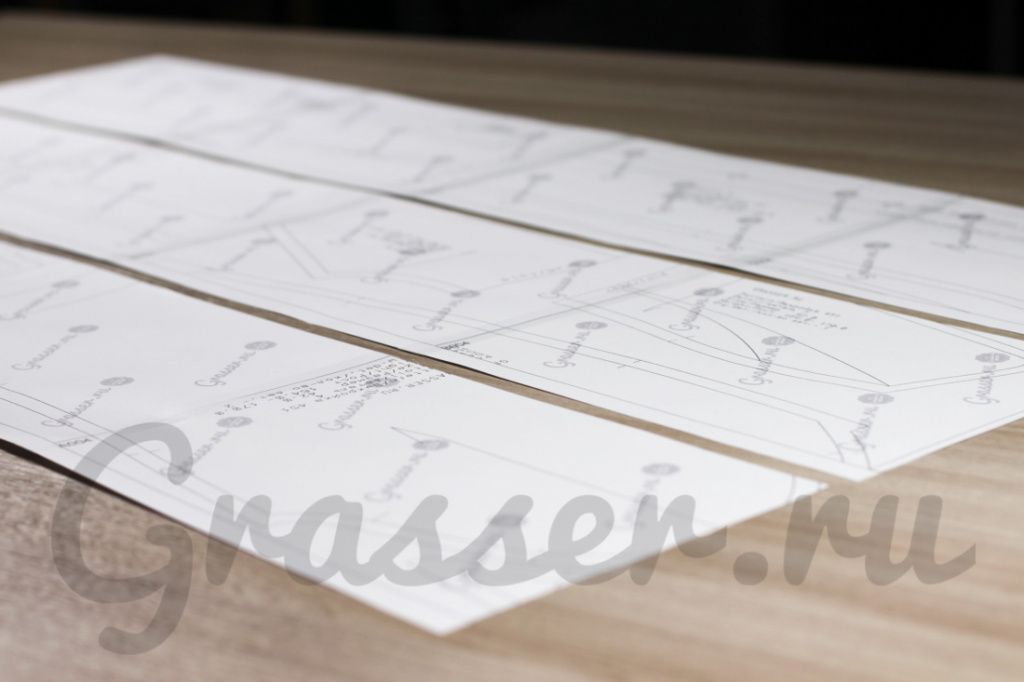
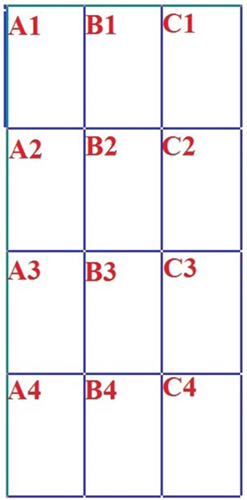
4. Glue the posts together, joining them in alphabetical order and glue all the sheets carefully with scotch tape. As a result of the gluing, horizontally the resulting pattern pattern must consistently follow the letters A, B, C, D, E . vertically the figures 1, 2, 3, 4, 5 ..
Читайте также: Шубы для собак с выкройкой
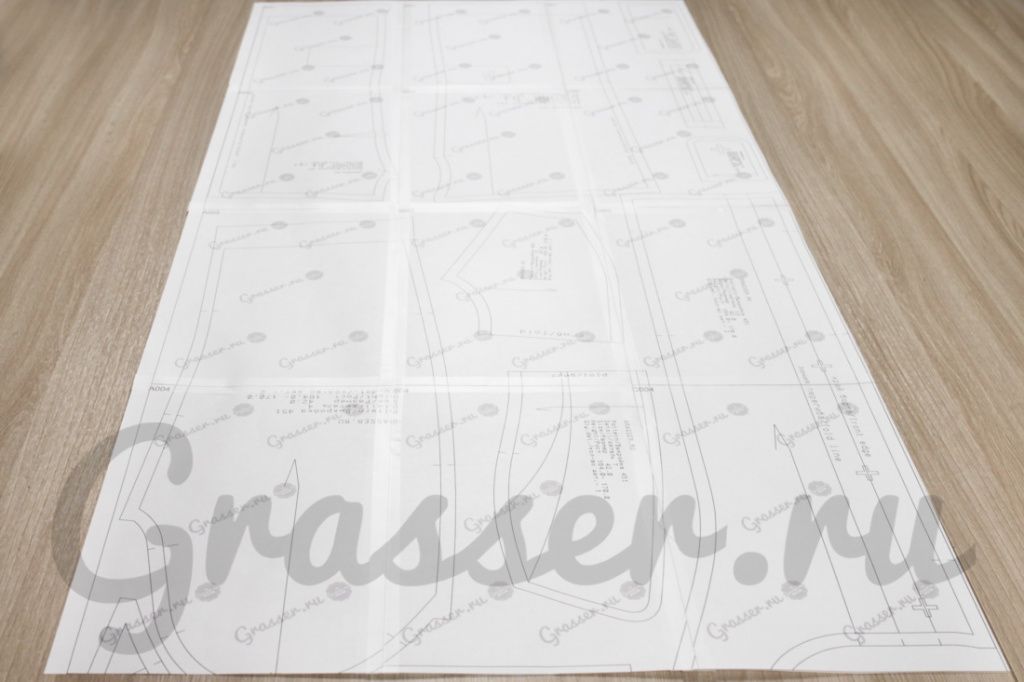
The principle of sheet assembly is shown in this diagram. The number of letters and numbers can be different (since the patterns are large and small), but the principle should be the following: the letters A, B, C, D, E . the numbers 1, 2, 3, 4, 5
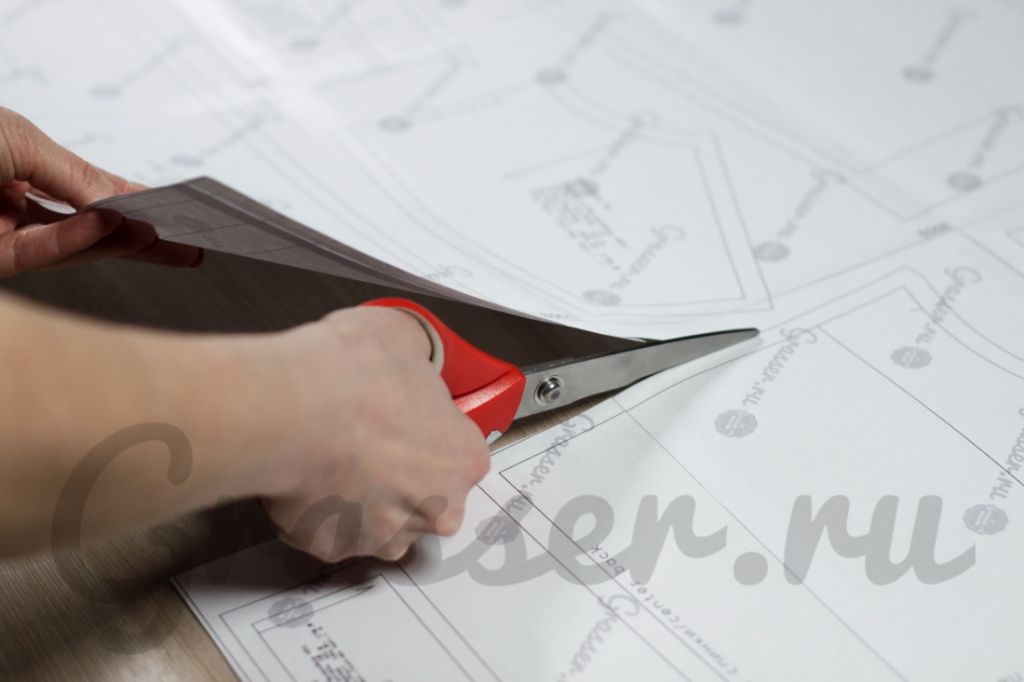
5. Cut out the details. Pattern is ready.
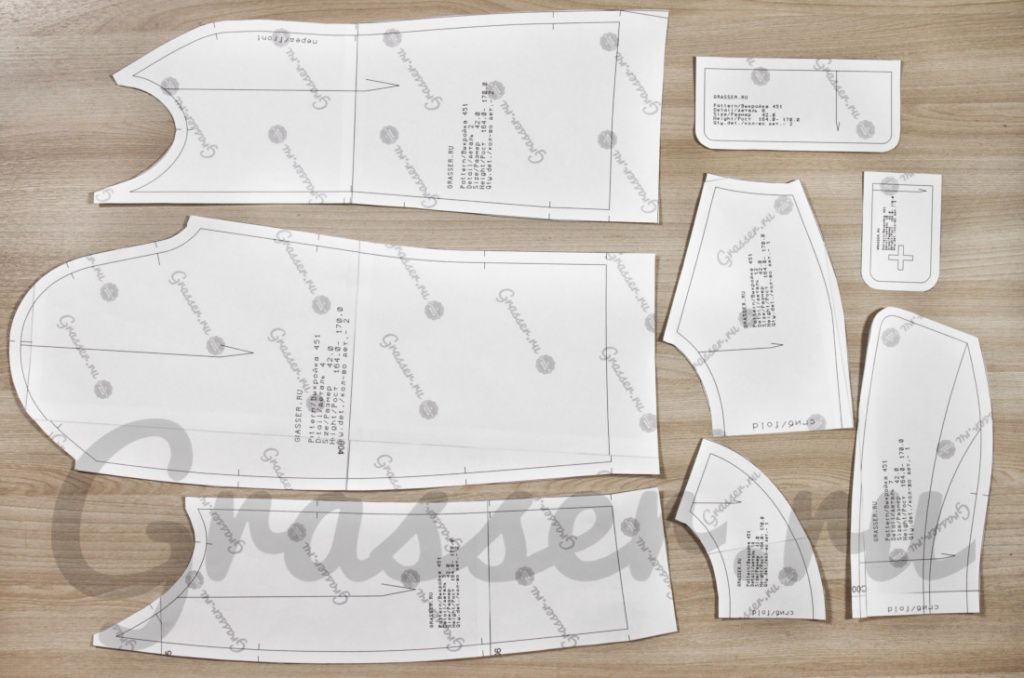
We hope, that at you all has turned out!) Success in tailoring!
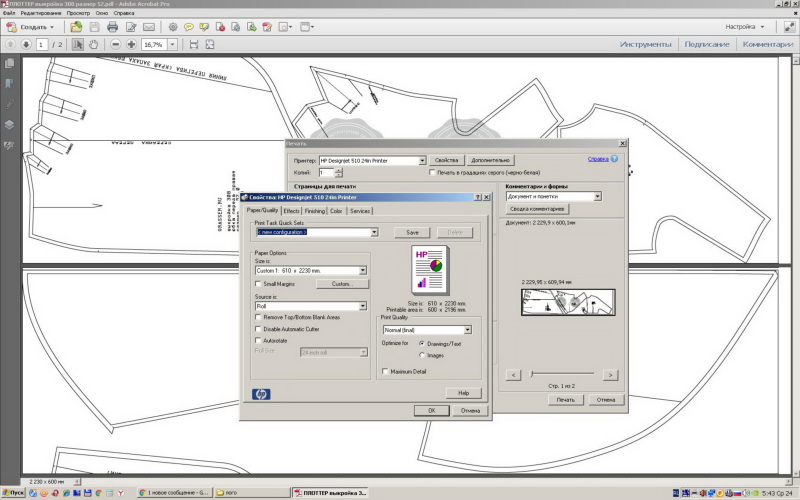
Instructions for printing on a wide-format plotter:
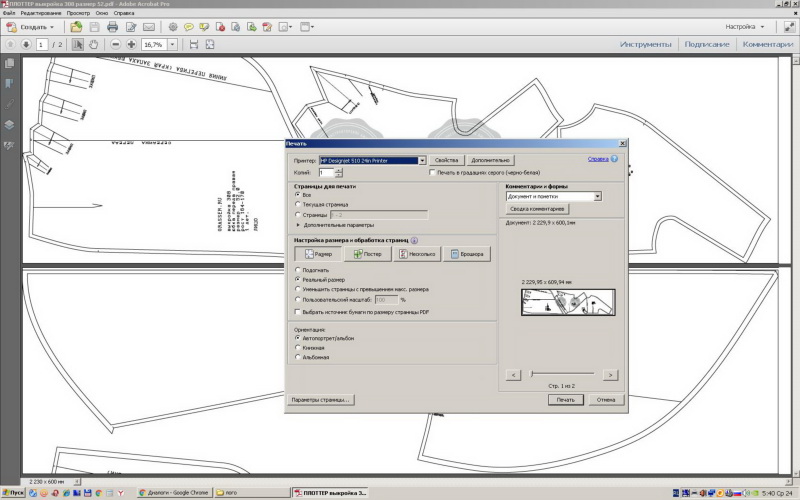
1. Open the PDF pattern in Adobe Reader (there are settings «real size», «Auto portrait»)
2. Next, open the «Properties»
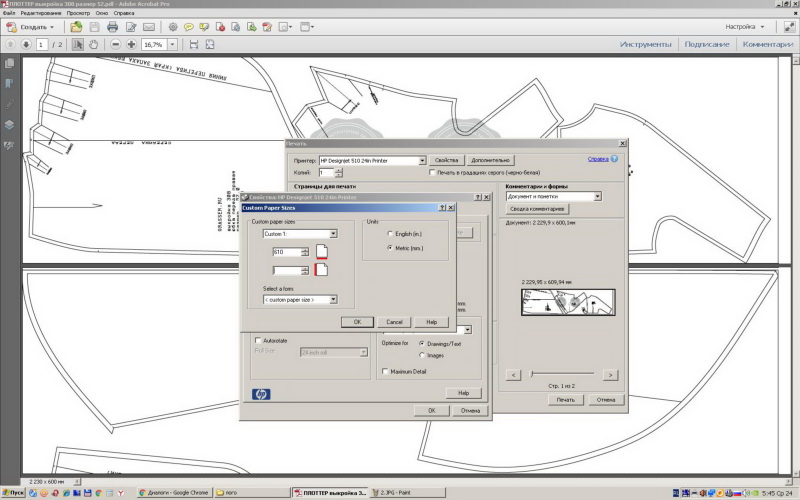
3. In «Properties» open «Custom» and there enter the width and length of the file in the fields (These numbers can be viewed in the lower left corner of the screen by moving the cursor over it).
Grasser как собрать выкройку
Как распечатать выкройку в формате А4:
Перед Вами выкройка в формате А4 в pdf-файле. Распечатать ее правильно не составит труда, если выполнить несколько условий:
В разделе «Настройка размера и обработка страниц» поставьте «галочку» напротив «Пользовательский масштаб», выберите 100%;
Там, где «ориентация», поставьте «галочку» напротив «Авто»;
Убедитесь, что Вы выбрали необходимый принтер для печати (в окошке, напротив «Принтер»);
Можно нажать кнопку «Печать»;
Если Вам необходимо распечатать какие-то страницы отдельно, перед тем как отправить выкройку на печать, выберите определенные вами страницы.
На 1 странице есть тестовый квадрат 5*5 см. Проверьте его с помощью линейки. Если всё верно, смело переходите к склейке выкройки.
Как склеить выкройку из листов формата А4:
Чтобы склеить выкройку, Вам понадобится клей-карандаш (или прозрачный канцелярский скотч, шириной 1,5-2 см) и ножницы для бумаги. Затем:
Обрезать поля справа (там, где идет информационная строка);
Посмотреть в Инструкции к купленной выкройке схему склейки выкройки для Вашего размера и склеивать последовательно листы рядами (А1+А2…)
Склеив все ряды, склеиваем их между собой последовательно (ряд А+ ряд В…).
Из полученного бумажного полотна вырезаем детали выкройки.
Для наглядности, мы сняли для вас видео
Как распечатать выкройку в формате Плоттер:
Откройте pdf-файл с выкройкой в формате плоттер.
Зайдите во вкладку «Файл», далее нажмите «Печать»;
Убедитесь, что Вами выбраны настройки «Реальный размер» и «Авто»;
Откройте вкладку «свойства», далее «Custom»;
Внесите в поля длину и ширину. Это можно узнать, наведя курсор на серое поле файла, слева внизу всплывет окошко со значениями, например, 1760*610, где 1760 – длина (мм.), а 610 – ширина (мм.)
Grasser как собрать выкройку
Перед тем как распечатывать выкройку вам необходимо подобрать подходящий масштаб для печати в настройках вашего принтера.
Это необходимо сделать для того, чтобы при печати не исказились размеры деталей выкройки, чтобы сошлись все линии, и чтобы у листов выкройки были поля для склеивания и нумерация. Проверить верный масштаб вам поможет лист с тестовым квадратом.
ЭТО ВАЖНО! Наши выкройки проектируются с помощью двух профессиональных программ САПР. После конвертации в pdf файлы выкроек из двух программ имеют различия по масштабу печати.
Поэтому у нас есть две схемы печати, которые мы подробно рассмотрим в этой инструкции.
СХЕМА ПЕЧАТИ 1. Тестовый квадрат.
СХЕМА ПЕЧАТИ 2. Тестовый квадрат №2.
ВАЖНО! Обращаем ваше внимание — всегда распечатывайте квадрат перед печатью выкройки! Используйте только тот тестовый квадрат, который прилагается к вашей выкройке в заказе.
Читайте также: Выкройки платья с одним руковом
ВАЖНО! Не печатайте файл из браузера, обратите внимание, что печать из браузера может быть некорректной. Нужно печатать выкройку, сначала скачав файл на устройство.
СХЕМА 1. Печать по «Тестовому квадрату» — Test_kvadrat_grasser.pdf
При покупке вы получили ссылки на скачивание файлов в формате pdf. Один файл называется «Test_kvadrat_grasser.pdf». Другие файлы непосредственно с выкройкой. Откройте файл «Тестовый квадрат» и выберете в меню команду «Печать».
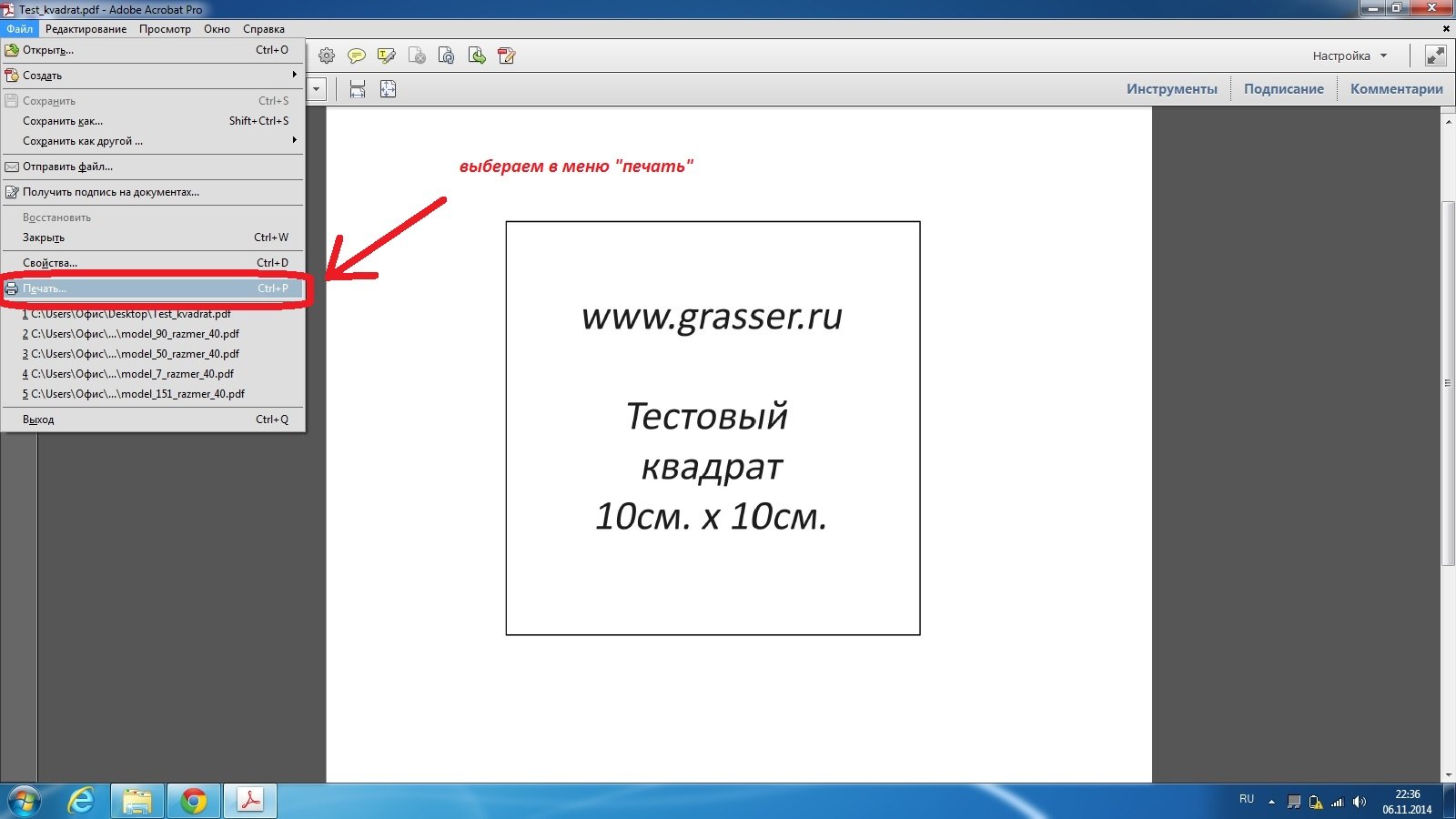
—В меню настроек принтера выберете настройку «пользовательский масштаб 95%»
-В настройках «Ориентация» нужно выбрать «Автопортрет/альбом».
Обратите внимание , в настройке Ориентация должно стоять именно «автопортрет/альбом», из-за неправильно выставленной ориентации листа могут съезжать поля листа, не сходиться линии выкройки. Настройка также может называться «Авт.книжная/альбомная».
-Обратите внимание! Галочку в поле «выбрать источник бумаги по размеру страницы pdf» ставить не нужно!
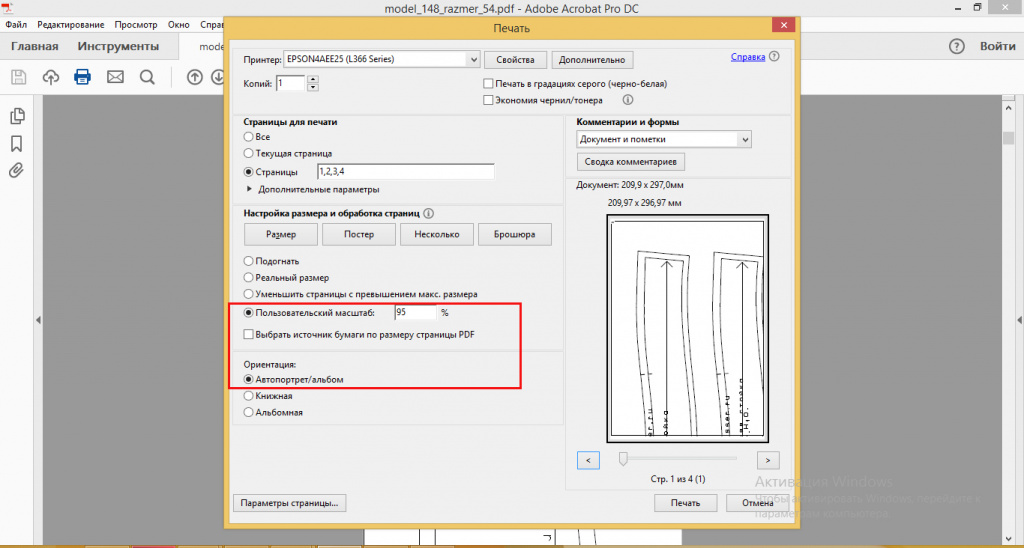
Распечатайте тестовый квадрат с этими настройками. Измерьте линейкой стороны квадрата. Если стороны равны 10 см на 10 см., то в этом случае можно открывать файл с выкройкой и с такими же настройками распечатывать листы с выкройкой. Если стороны квадрата не равны 10 см. на 10 см., то нужно вернуться в настройки и поменять их на «пользовательский масштаб 94 или 96%».
Нужно будет менять настройки масштаба в том месте, где показано на фото, до тех пор пока стороны вашего тестового квадрата не будут равны 10 см., после этого запомнить цифру масштаба и с ними распечатать листы выкройки. При печати последующих выкроек всегда проверяйте настройки принтера и печатайте тестовый квадрат.
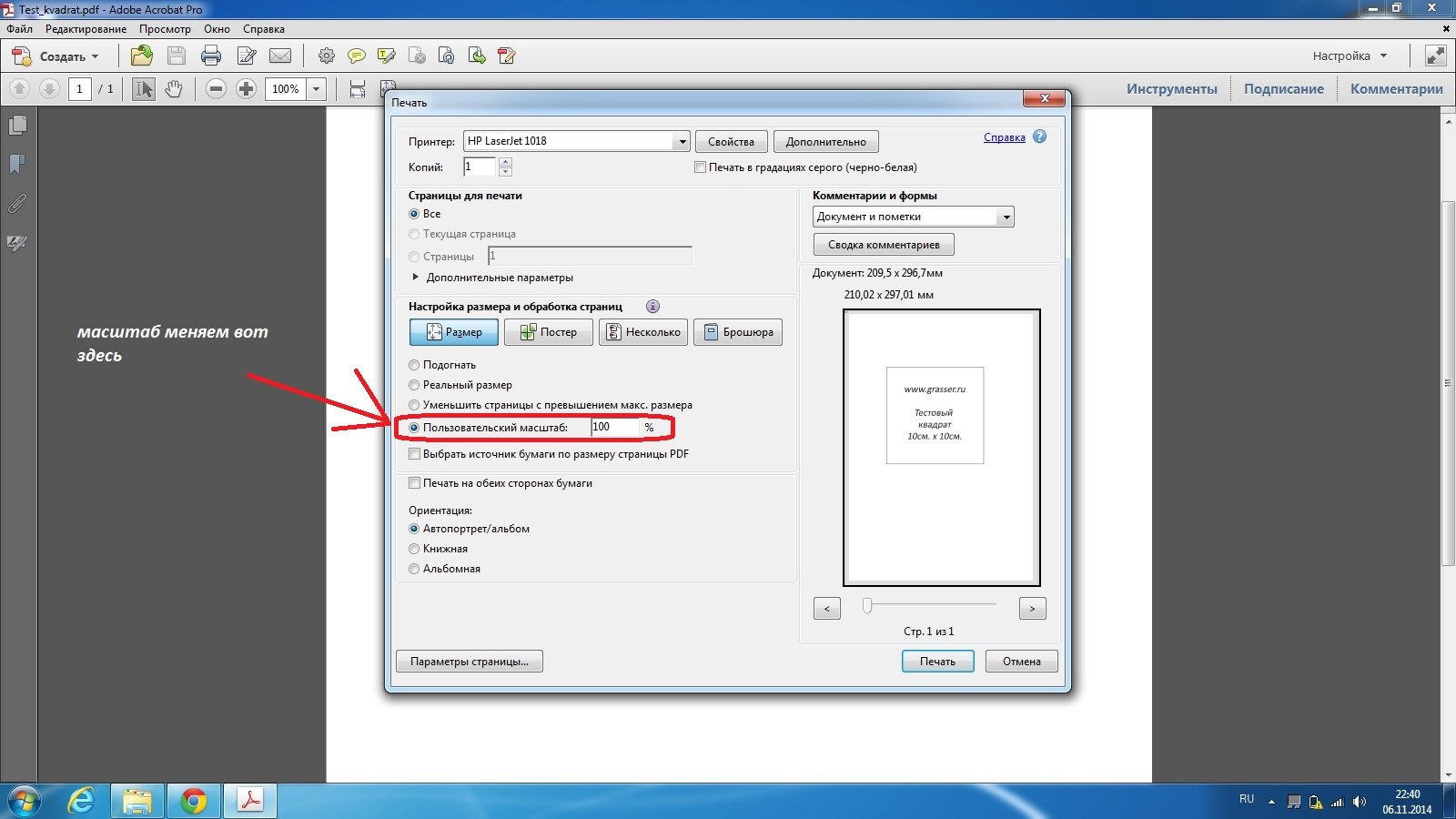
СХЕМА 2. Печать по тестовому квадрату № 2. — Test_kvadrat_grasser_№2.pdf
При покупке вы получили ссылки на скачивание файлов с выкройкой, в формате pdf. Первым листом в этих файлах будет Тестовый квадрат №2.
Важно! Всегда сначала распечатывайте квадрат перед печатью выкройки!
Откройте файл и выберите в меню команду «Печать».
— В меню настроек принтера выберете «пользовательский масштаб 100%».
— В настройках «Ориентация» нужно выбрать «Автопортрет/альбом».
Обратите внимание , в настройке Ориентация должно стоять именно «Автопортрет/альбом», из-за неправильно выставленной ориентации листа могут съезжать поля листа, не сходиться линии выкройки. Настройка также может называться «Авт.книжная/альбомная».
— Обратите внимание! Галочку в поле «выбрать источник бумаги по размеру страницы pdf» ставить не нужно!
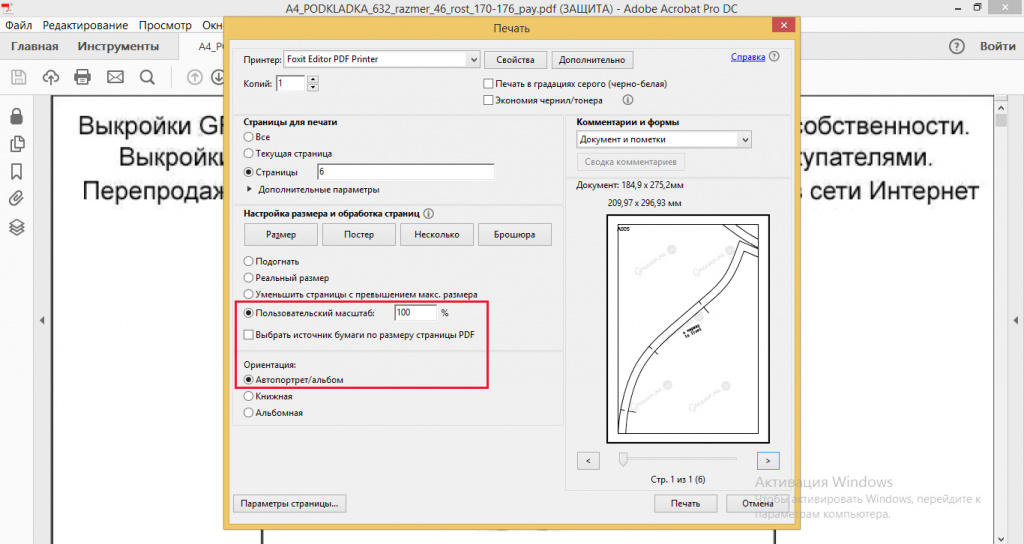
Распечатайте тестовый квадрат с этими настройками. Измерьте линейкой стороны квадрата. Если стороны равны 10 см на 10 см., то в этом случае можно открывать файл с выкройкой и с такими же настройками распечатывать листы с выкройкой. Если стороны квадрата не равны 10 см. на 10 см., то нужно вернуться в настройки и подобрать другую цифру процентов в настройке «пользовательский масштаб».
Мы рекомендуем открывать файлы и печатать из программы Adobe Acrobat Reader. Все вышеизложенные скриншоты экрана и настройки печати даны для этой программы. Если вы используете для печати другую программу, настройки печати могут отличаться. Ориентиром для корректности размера выкройки служит распечатанный тестовый квадрат 10 на 10 см., который идет в комплекте с вашей выкройкой.
Для проверки также вы можете измерить распечатанную на листе область. Рамки на листе могут варьироваться от 1см до 1,4см. (зависит от подачи механизма вашего принтера), а распечатанная область от рамки до рамки должна составлять 184на274мм.
Для печати без смещений линий листы в лотке должны лежать максимально одинаково, без перекосов.
Краткая инструкция по печати для обладателей MacBook
Читайте также: Бортики подушечки в кроватку своими руками выкройки с размерами
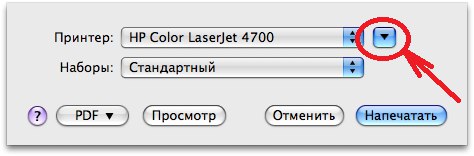
1.Для доступа к дополнительным настройкам нажмите голубую кнопку (справа от раскрывающегося меню «Принтер:»). Развернется диалоговое окно печати.
2. Выбираете настройки. Здесь вы можете сразу выставить масштаб. Для Тестового квадрата «Test_kvadrat_grasser.pdf» подойдет 95%. Для Тестового квадрата №2 «Test_kvadrat_grasser_№2.pdf» подойдет 100%. Далее печатайте выкройку с подобранными настройками.
КАК СКЛЕИТЬ РАСПЕЧАТАННУЮ ВЫКРОЙКУ.
После того как вы распечатали выкройку, можно приступать к ее «сборке».
Все листы имеют в верхнем левом углу букву с цифрой. Таким образом вы можете распознать верх и низ листа.
1. По краям листов есть рамка, срежьте ее снизу и справа.
2. Теперь нужно склеить листы в соответствии с пометками на полях (А1, А2,…B2,B3…). Разложите ряд А в столбик. Он располагается по вертикали. Склейте листы ряда А между собой. Каждый последующий лист находится под предыдущим. Стыковкой служит линия рамки.
3. Склейте в столбик следующий ряд с буквой В и соберите в столбик так каждую букву.
4. Cклейте между собой столбики, стыкуя их по алфавиту и проклейте все листы тщательно скотчем.
В результате склеивания, по горизонтали получившегося полотна выкройки должны последовательно идти буквы A,B,C,D,E…, по вертикали цифры 1, 2, 3, 4, 5..
Принцип сборки листов показан на этой схеме. Количество букв и цифр может быть разное, (так как выкройки есть большие и маленькие), но принцип должен быть такой — по горизонтали последовательно идут буквы A,B,C,D,E…, по вертикали цифры 1, 2, 3, 4, 5..
5. Вырежьте детали. Выкройка готова.
Надеемся, что у вас все получилось!) Удачи в пошиве!
Как распечатать выкройку на плоттере
Мы рекомендуем печатать выкройку на плоттере с настройками «реальный размер» + «автопортрет» — при таких настройках печать будет корректной. Но если Вам дополнительно потребуется проверка настроек печати, то можно проверить корректность печати по тестовому квадрату для плоттера. Квадрат при настройках «реальный размер» и «автопортрет» должен быть 10 на 10 см.
При покупке выкройки вы получаете в комплекте с выкройкой тестовый квадрат для печати на широкоформатном плоттере. Этот квадрат другой! Будьте внимательны. Квадрат с названием test_kvadrat_grasser_plotter служит для проверки настроек печати плоттера, не используйте его для настроек печати А4.
Инструкция для печати на плоттере:
1. Открыть выкройку PDF в Adobe Reader (стоят настройки «реальный размер», «автопортрет»)
3. В «Свойствах» открыть «Custom» и там в поля внести ширину и длину файла (Эти цифры можно посмотреть в левом нижнем углу экрана, наведя на него курсор).
ВАЖНАЯ ИНФОРМАЦИЯ. Наши новые выкройки защищены паролем на редактирование. Будьте внимательны, распечатать выкройку на плоттере без пароля возможно из программы ДЛЯ ЧТЕНИЯ файлов. Самая простая программа по умолчанию — Adobe Reader, используйте ее для открытия выкройки и последующей печати.
Если на плоттере установлена на открытие файла программа-редактор (например, CorelDraw), то через нее распечатать выкройку можно только с паролем. Узнать пароль можно, обратившись на info@grasser.ru (укажите номер заказа).
И еще! )) Вы можете распечатать выкройку у нас в Бюро в Санкт-Петербурге! Для этого вам нужно купить выкройку на сайте, и отправить заявку на печать на print@grasser.ru , указав номер оплаченного заказа.
Стоимость печати — 100 руб. за метр печати.
Ширина листа стандартная — 60 см, а длину листа (сколько метров печати получается) можно посмотреть, открыв файл с плоттерной выкройкой в Adobe Reader и наведя курсор в нижний левый угол — там появится размер листа)
- Свежие записи
- Балкон в многоквартирном доме: является ли он общедомовым имуществом?
- Штраф за остекление балкона в 2022: что это и как избежать наказания
- Штраф за мусор с балкона: сколько заплатить за выбрасывание окурков
- Оформление балконного окна: выбираем шторы из органзы
- Как выбрать идеальные шторы для маленькой кухни с балконом